
Dashboard Settings
Global gateway configuration and limits.
Global Configuration
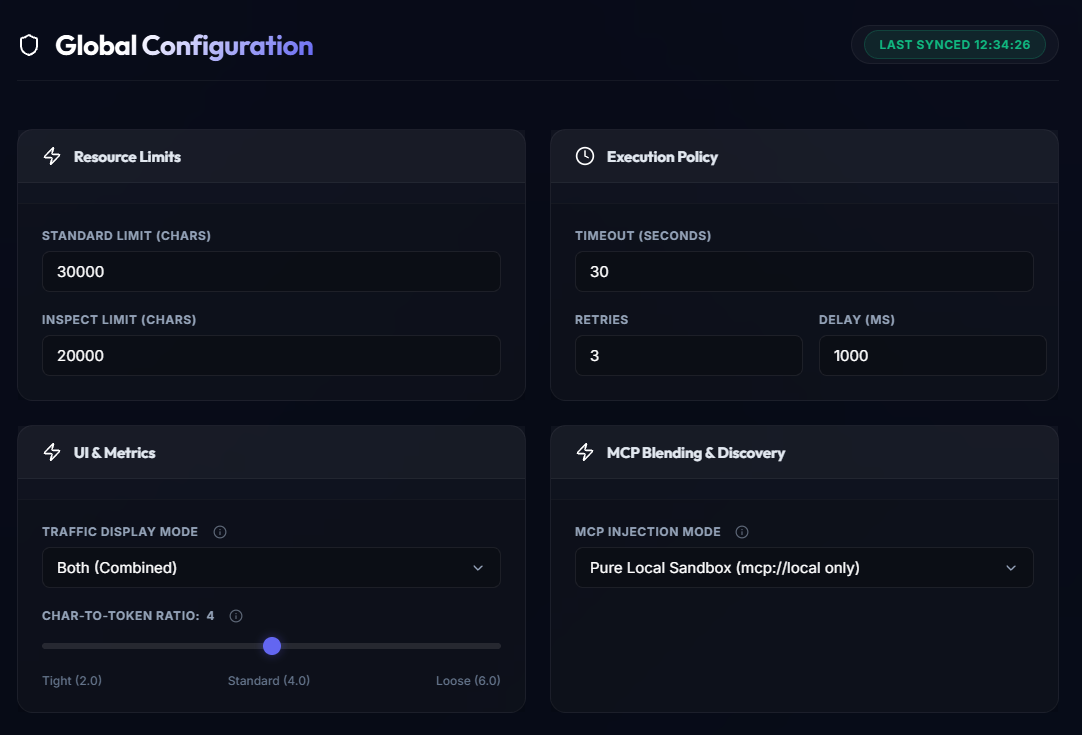
The Global Configuration panel allows you to adjust the core behavior of the Elemm Gateway in real-time. Any changes made here are instantly synchronized with the backend.
Resource Limits
Control the maximum payload sizes to prevent context window overflow:
- Standard Limit (Chars): The maximum number of characters returned by standard tool calls (default:
30000). If a response exceeds this, the ResponseSquisher will dynamically paginate or truncate it. - Inspect Limit (Chars): The character limit specifically applied when the agent uses
inspect_landmarkto discover tool signatures (default:20000).
Execution Policy
Configure the gateway's resilience and timeout parameters:
- Timeout (Seconds): Maximum time allowed for an API request before the gateway aborts it (default:
30). - Retries: The number of automatic retry attempts the SmartRepair Engine will perform if an external API fails (default:
3). - Delay (MS): The wait time between retry attempts in milliseconds (default:
1000).
UI & Metrics
Adjust how telemetry and token calculations are displayed in the dashboard:
- Traffic Display Mode: Toggle between combined traffic (Both), or isolate specific traffic streams.
- Char-To-Token Ratio: A slider (from Tight
2.0to Loose6.0) to estimate token usage based on character count. A standard value of4.0is generally accurate for English text, but can be adjusted for languages or code that tokenize differently.
MCP Blending & Discovery
Control how local and remote MCP servers are exposed to the AI agent:
- MCP Injection Mode: Determines the blending behavior. For example,
Pure Local Sandbox (mcp://local only)ensures the agent only sees MCP servers that are explicitly mounted in the local environment, providing strict boundary control.
Self-Hosted Client Config Generator
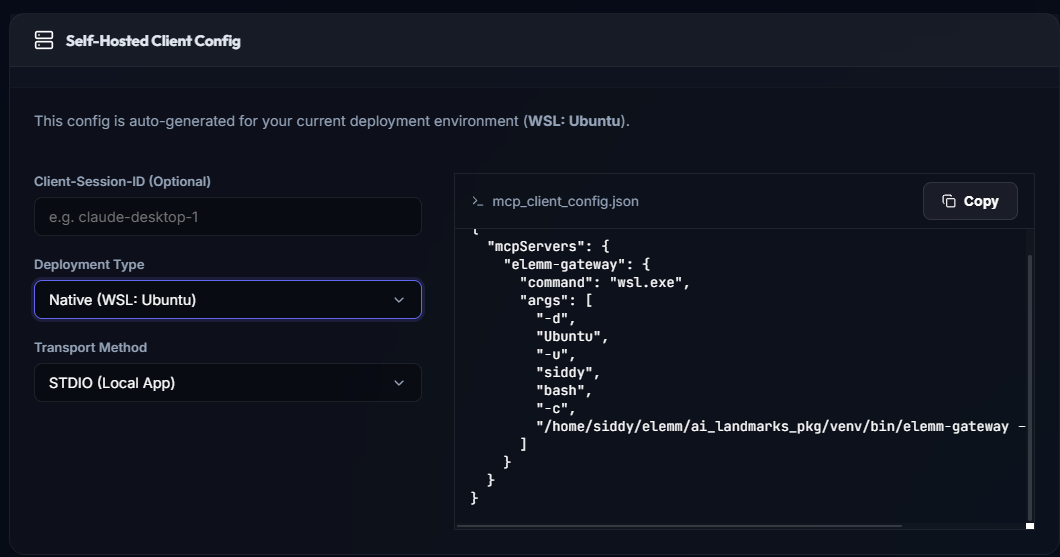
At the bottom of the Settings page, you will find the Self-Hosted Client Config Generator. This interactive tool automatically detects your current deployment environment (OS, WSL Distribution, Username, and Binary Paths) and generates a perfectly formatted JSON configuration snippet for your AI Agent.
You can customize:
- Client-Session-ID: An optional identifier passed as
--nameto the gateway. - Deployment Type: Choose between Native Auto-Detect (which handles Windows, Linux, macOS, and WSL natively) or a Docker Container setup.
- Transport Method: STDIO (local) or SSE (remote).
Simply copy the generated output and paste it into your MCP client's configuration file (e.g., Cursor, RooCode, or Claude Desktop). For more details on configuring your clients, see the MCP Client Setup guide.
If you have existing tools in another MCP client and want to route them through Elemm, see the Bulk Config Migration section in the MCP Server Configuration guide.