
Security Panel
Visual editor for the Guardian Policy Engine.
Security Governance
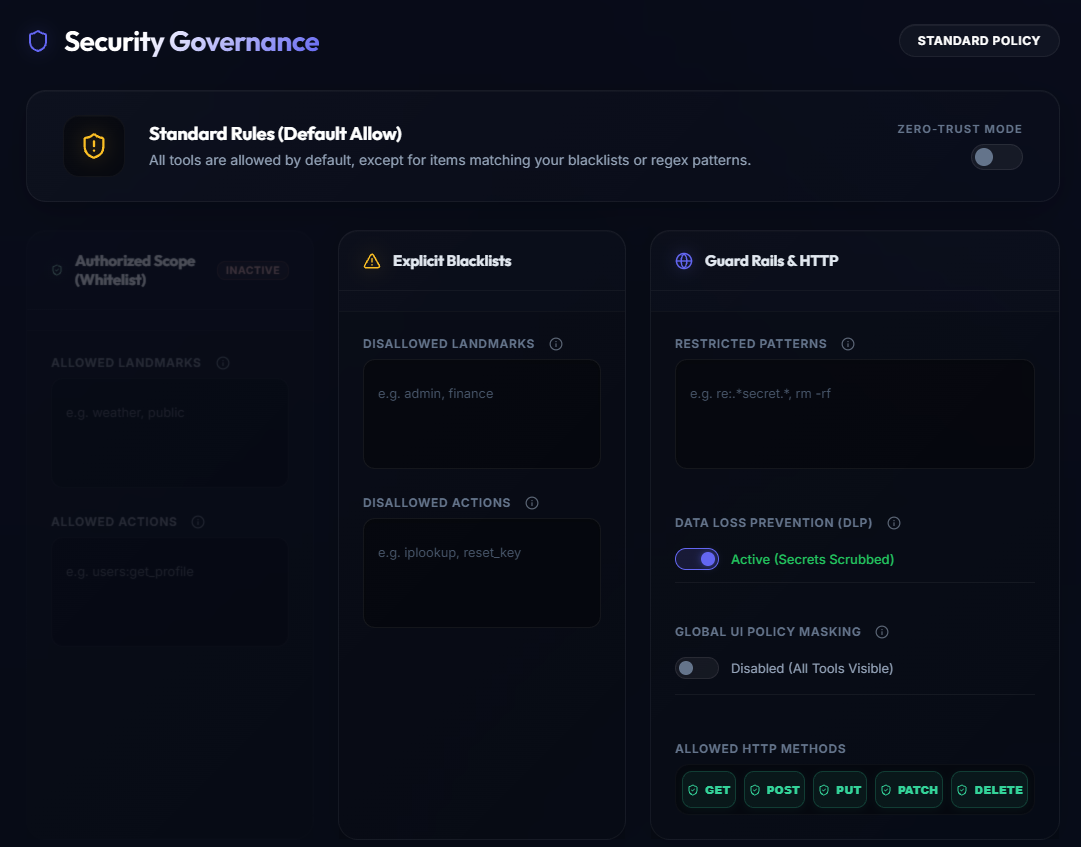
The Security Panel is the visual editor for the Elemm Guardian Policy Engine. It allows you to configure rules that restrict what the AI agent is allowed to access and do, without needing to write JSON configuration files.
Key Features
- Zero-Trust Toggling: Switch between default-allow (blacklist) and zero-trust (whitelist) operating modes instantly.
- Deep Pattern Inspection: Block specific substrings or regex patterns across tool names and nested arguments.
- Data Loss Prevention (DLP): Toggle automatic scrubbing of sensitive vault keys from agent responses.
- Custom Remediation: Override generic "Access Denied" errors with contextual advice (e.g., "Use a read-only alternative") to help the agent recover.
Core Operating Modes
At the top of the panel, you can toggle the gateway's fundamental operating mode:
- Standard Rules (Default Allow): All discovered tools are allowed by default, except for items explicitly blocked in your blacklists or regex patterns.
- Zero-Trust Mode: Flipping this toggle reverses the logic. Everything is blocked by default. You must explicitly define allowed routes in the Authorized Scope (Whitelist) section (which becomes active in this mode).
Policy Configuration
1. Authorized Scope (Whitelist)
Only active in Zero-Trust Mode. Define exact ALLOWED LANDMARKS (e.g., weather, public) and ALLOWED ACTIONS (e.g., users:get_profile). Any request falling outside this scope is denied.
2. Explicit Blacklists
Explicitly block specific areas or tools from being accessed:
- Disallowed Landmarks: Hides entire functional areas (e.g.,
admin,finance) from the agent. - Disallowed Actions: Blocks specific functions (e.g.,
iplookup,reset_key).
3. Guard Rails & HTTP
Fine-tune deep inspection and transport-level security:
- Restricted Patterns: Enter substrings or regular expressions (prefixed with
re:, e.g.,re:.secret.orrm -rf). The Guardian performs Deep Argument Inspection and blocks the request if these patterns are found in the tool name or any nested JSON arguments. - Data Loss Prevention (DLP): Activating this automatically scrubs known secrets (from the Vault) from all API responses before they reach the LLM.
- Global UI Policy Masking: When enabled, blocked tools are entirely hidden from the UI and discovery. When disabled, they remain visible but are inaccessible.
- Allowed HTTP Methods: Easily toggle which REST methods the agent is allowed to execute globally (e.g., disable
DELETEandPUTto make the gateway strictly read-only).
Custom Remediation Messages
When an AI agent's request is blocked by the Guardian, it usually receives a generic "Access Denied" error. The Custom Remediation Messages panel allows you to override this behavior.
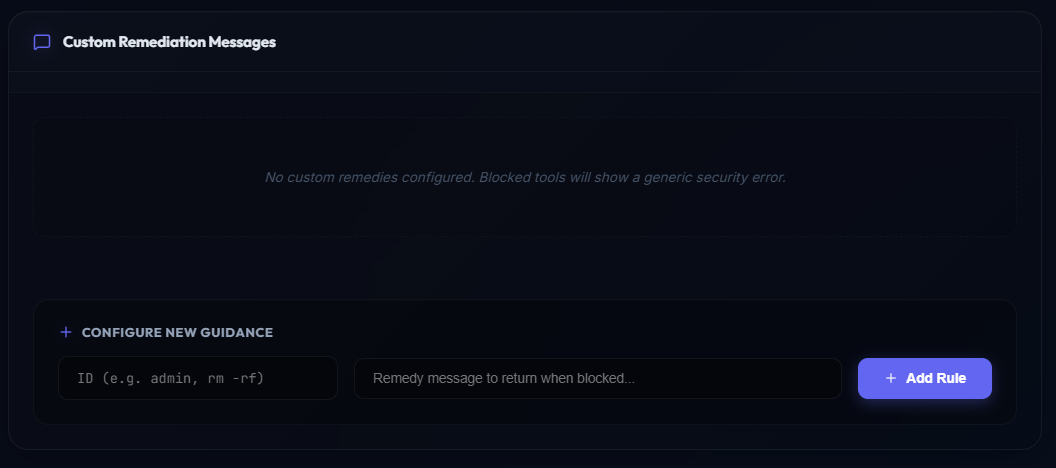
Instead of a generic error, you can return a "Remedy"—a contextual instruction that tells the agent why it was blocked and what it should do instead.
- Configure New Guidance: Enter the ID of the blocked pattern, landmark, or action (e.g.,
adminorrm -rf), and provide a custom remedy message. - Example: If you block
delete_user, the remedy message could be: "Destructive operations are disabled. Usearchive_userinstead." This helps the autonomous agent recover gracefully without hallucinating.